Custom Orthotic Insole Prototyping with Shore-A 85 TPU: Expert Guide
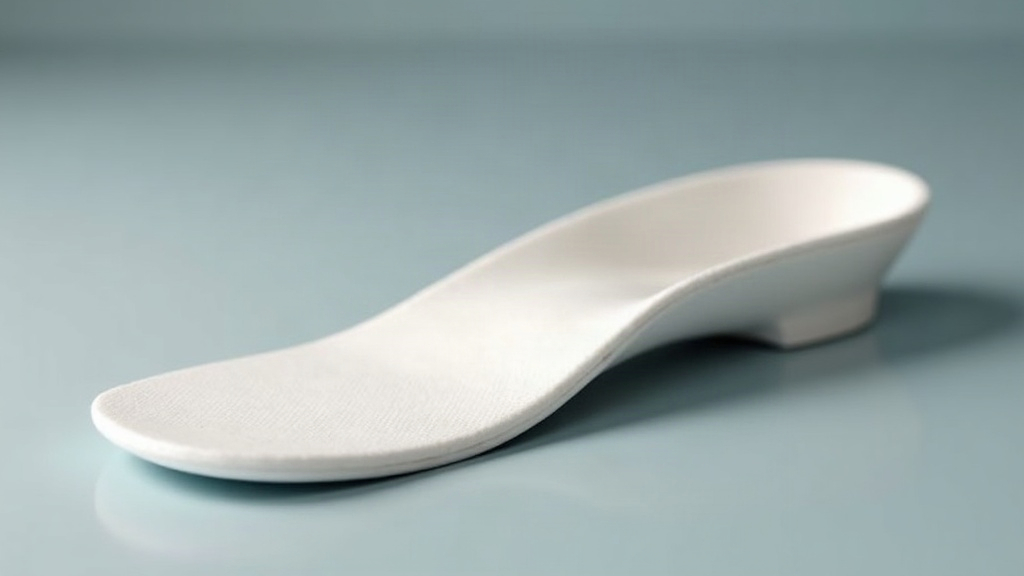
Custom Orthotic Insole Prototyping with Shore-A 85 TPU
Turning a foot scan into a wearable orthotic used to mean weeks of back-and-forth with a lab. Now, with Shore-A 85 TPU on an FDM printer, you can go from scan to working prototype in an afternoon. This particular hardness sits in a sweet spot: firm enough to hold an arch correction under load, soft enough to actually flex when someone walks on it. This guide walks through material choice, printer and slicer settings, design strategy, and the testing loop that gets a prototype closer to something you’d actually hand to a patient—just make sure your TPU filament is properly dried before printing.
Why Shore-A 85 TPU Works for Orthotics
The Shore A scale runs from soft gels around 20A up to semi-rigid plastics pushing 95A-100A. At 85A, TPU lands close to the firm cushioning compounds you’d find in commercial insoles and running shoe midsoles. Not coincidentally.
A few reasons this hardness keeps showing up in orthotic work:
- Support with compliance: an 85A insole holds its shape under body weight, so the arch doesn’t just collapse, but it still gives a little during gait instead of feeling like a plank.
- Abrasion and tear resistance: TPU shrugs off repeated heel strikes far better than PLA or PETG, which tend to crack or wear thin at flex points.
- Shock absorption: the elastic layer cuts peak pressure at the heel and under the metatarsal heads, right where most complaints originate.
- Chemical and moisture resistance: sweat, skin oils, the occasional wipe-down with cleaner, none of it degrades the material over time.
- Printability: softer TPUs in the 60A-75A range are notorious for jamming or stringing on FDM printers. 85A is stiff enough to feed reliably through a direct-drive extruder without much drama.
Choosing the Right 85A TPU Filament
Here’s a trap a lot of people fall into: not every filament labeled “TPU” is 85A. ePUS, Hatchbox, and Polymaker PolyFlex are often 95A, which prints noticeably stiffer and won’t behave the way you expect. Always check the datasheet, not just the label.
A few brands that reliably land at 85A:
- NinjaTek NinjaFlex (85A): the benchmark for flexible filament. Bonds layers cleanly, but wants slow print speeds, so don’t rush it.
- Priline TPU (85A): budget-friendly and prints well straight off a direct-drive setup.
- GIANTARM / Sainsmart 85A TPU: fine for early-stage prototypes where you’re still dialing in the design.
Whatever brand you pick, dry it first. 55-65°C for 4-6 hours before printing. TPU pulls moisture out of the air faster than most people expect, and wet filament shows up as bubbles, popping sounds mid-print, and weak layer adhesion. In a load-bearing insole, that’s not a cosmetic issue, that’s a part that fails.
Printer Setup and Slicer Settings
Get a direct-drive extruder if you can. Bowden setups technically work, but you’ll be cutting print speeds roughly in half and turning retraction off entirely, which is a compromise most people regret after the third failed print.
Starting settings that tend to work:
- Nozzle temperature: 220-240°C (230°C is a good first try for NinjaFlex).
- Bed temperature: 40-60°C, on textured PEI, glass with a glue stick, or BuildTak.
- Print speed: 15-30 mm/s. Slower on the walls, a touch faster through infill.
- Retraction: 0.5-1.5 mm at 20-25 mm/s if you’re on direct drive; skip it entirely on Bowden.
- Layer height: 0.2 mm balances surface finish against print time; drop to 0.16 mm if you need finer top contours.
- Infill: 20-40% gyroid. Gyroid spreads cushioning evenly in every direction and doesn’t create the stress concentration points you get with rectilinear patterns.
- Walls/perimeters: 3-4, enough to build a shell that actually survives daily wear.
Turn off combing (or set it to “not in skin”) to keep surface scuffing down, and switch on z-hop if you notice stringing creeping in.
Designing the Insole for Real Feet
Start from an actual foot. A generic last will never fit as well as geometry pulled straight from the person who’s going to wear it. An iPhone or iPad with LiDAR works surprisingly well for this, or photogrammetry, or a dedicated foot scanner if you have access to one. Import the mesh into Fusion 360, Rhino, or whatever orthotic-specific CAD tool you’re running.
Features worth building in:
- Arch support: pull the medial longitudinal arch contour directly from the scan data rather than eyeballing it.
- Heel cup: a shallow recess, 3-6 mm, keeps the heel centered and cuts down on lateral drift.
- Metatarsal pad: a small dome just behind the ball of the foot to spread out pressure that would otherwise concentrate there.
- Zoned cushioning: denser infill under the heel (30-40%) and softer, lower infill under the forefoot (15-25%). The foot doesn’t need the same support everywhere.
- Top cover allowance: leave 1-2 mm of clearance if a foam or fabric top layer is going on before this touches skin.
Print the first pass full-length so you can properly check fit. Once that’s dialed in, a 3/4-length version can shave weight if that matters for the final product.
Prototyping and Testing Workflow
Skip the guesswork. Print, measure, adjust, repeat:
- Print a low-infill draft (20%) first, just to check fit and comfort inside the actual shoe.
- Measure hardness with a Shore A durometer on a flat printed test coupon. Confirm you’re landing in the 82-88A range, since slicer settings can shift the effective stiffness away from the filament spec.
- Run a compression test: load it with body weight and measure how far it deflects. At 30% gyroid infill, an 85A insole typically deflects 3-6 mm under the heel. If yours is way off that, something in the infill or wall count needs adjusting.
- Flex-fatigue test: bend the forefoot section repeatedly and watch for cracking or delamination at the layer lines.
- Wear test it for 5-10 days, then check for compression set (permanent flattening where it shouldn’t be). Adjust infill or wall count based on what you find.
Too soft? Bump up infill and wall count before you reach for a harder filament. Too rigid? Drop the infill or add some perforations to loosen it up.
Common Problems and Fixes
- Stringing and oozing: dry the filament again, nudge retraction distance down slightly, and increase travel speed.
- Poor layer adhesion: raise nozzle temp in 5°C increments and slow down the outer walls.
- Lifting off the bed: add a brim, clean the build plate properly, double-check bed temperature.
- Hardness readings all over the place: keep infill and wall settings identical between test iterations, otherwise you’re not comparing anything meaningful.
Conclusion
Shore-A 85 TPU gives designers and clinicians a genuinely fast path from a foot scan to a working correction, no lab turnaround required. Pick a filament that’s actually 85A (not just labeled that way), keep printer settings conservative on a direct-drive setup, build the design around real scan geometry, and test deflection and fatigue instead of trusting how it feels in your hand. Do that consistently and the results hold up surprisingly well against injection-molded orthotics, at a fraction of the time and cost.